
SysAid’s AI Automations Builder: An ITSM industry first

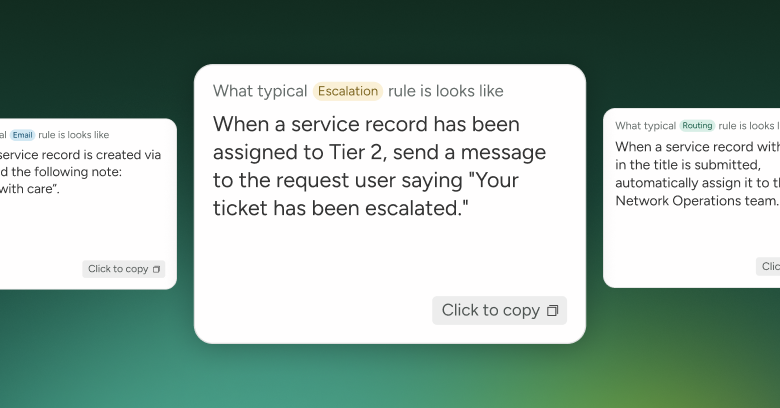
Our new AI Automations Builder helps you easily manage and create automations using a conversational AI chatbot. Just type in what you want, or use a prebuilt template, to automatically assign, prioritize, escalate, and categorize tickets, helping you get set up and running in no time!
Start putting AI to work
In a world of AI, it only makes sense to say goodbye to the old, tedious way of setting up ITSM ticket automations. That’s why we’re introducing our new AI Automations Builder—a one-stop shop to manage and create ticket-related actions and rules using conversational AI.
Take a look at what you can do:
Assign: When a ticket comes in, you can use several variables to decide exactly who it is assigned to. For example: If a ticket is submitted by a Director or above, assign it to the urgent response team and notify the IT manager.
Prioritize: Set rules for ticket prioritization, and AI will update tickets accordingly.
For example: If a ticket mentions that the internet or Wi-Fi is not working, mark it as P1.
Categorize: Set up rules and let the AI automatically update the ticket to the correct category.
For example: If a ticket mentions ‘password’, put it in the credential reset category.
Escalate: Don’t miss important SLAs or overlook requests by setting up time-sensitive rules.
For example: When a ticket’s priority is changed to Urgent, assign it to the Senior Support Team.
It’s never been easier to get your IT service management platform set up, running, and doing the heavy lifting for you!
Tell our AI Automation Builder what you want, and like magic, IT happens
Simply describe, in your own language, what you want to automate, and our AI Automation Builder gets to work identifying the triggers, setting conditions, and adding actions to build out a complete automation rule. All you need to do is click automate, and SysAid will automatically triage tickets, notify stakeholders, update statuses, and more. No code, no automation expert, no hassle… just an ITSM that handles all of the repetitive work without human involvement.

We have also created pre-built templates for the most requested automations—all you need to do is select the template and update it with your desired options.
What this means for you and your IT support team
Automations make everyone’s life easier. Tickets are always routed to the right person in the right way. SLAs are easy to manage with priorities and escalations. Tickets enter the workflow designed just for them, with the correct categorization. And everyone is notified along the way.
SysAid helps your team work on projects and issues that truly need an IT agent. Everything else should take care of itself, and AI Automations make that happen.
Ready to automate with AI? Contact us for a personal demo.
Did you find this interesting?Share it with others:
Did you find this interesting? Share it with others:

AI in ITSM hits 61% adoption, but most teams are only scratching the surface
7 ways automated ticket routing transforms your service desk operations in the age of agentic AI

The real risks and rules for ‘Agentic’ AI browsers

Riding the Hype – Is Cursor AI a Game Changer for Developers and ITSM?
AI Mania: DeepSeek Doubling Down on the Evolving, Growing Need for AI

Top 7 CEOs on Agentic AI: Insights from the Frontlines of Innovation