
It’s time to move away from using spreadsheets for IT asset management

Every IT team has a spreadsheet with a tab for laptops, a tab for software licenses, and a tab for printers that someone started three years ago. It lives in a shared drive and gets updated when someone remembers. It’s not what you could call reliable.
IT asset lifecycle management is a living process. A spreadsheet is a static document. And that gap costs money. On average, organizations waste 30% of their software budget on unused licenses or licenses assigned to employees who left months ago. Most of that waste is invisible until someone goes looking. Most teams don’t have time to go looking.
What IT asset lifecycle management involves, and why it matters
IT asset lifecycle management is the process of tracking and managing every asset your organization owns, from the moment it’s purchased until the moment it’s decommissioned. Hardware like laptops, servers, and monitors, as well as software licenses. Knowing who has what, what state it’s in, when it needs to be replaced, and what happens to it when it does.
Done well, it keeps your IT budget under control, reduces security risk, and takes the chaos out of audits. When done badly, it creates a slow-building mess that only becomes visible when something goes wrong.
Where spreadsheets fail for IT asset lifecycle management
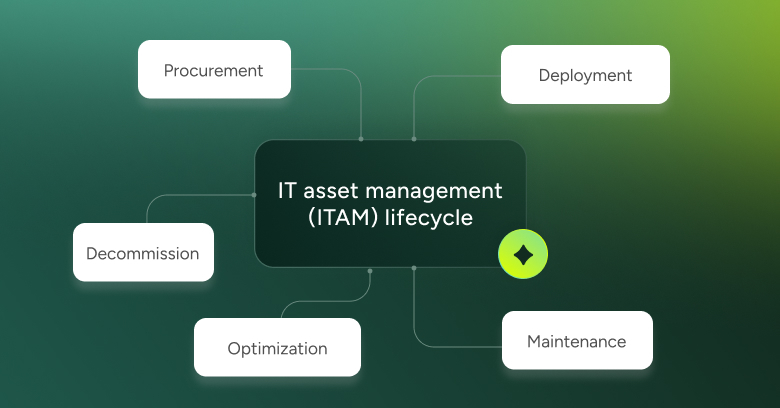
The IT asset lifecycle has five stages: procurement, deployment, maintenance, optimization, and decommission. A spreadsheet struggles at every single one.
- Procurement. A new batch of laptops arrives. Someone updates the sheet. But the purchase order lives in finance, the warranty details are in an email, and the serial numbers got typed in manually. You already have three sources of truth competing with each other.
- Deployment. The laptop gets assigned to a new hire. The spreadsheet might get updated, depending on who’s covering that week. If the new hire changes teams before onboarding is done, that assignment might never get corrected. Now you have an asset assigned to someone who doesn’t have it.
- Maintenance. Warranty renewals, scheduled updates, refresh cycles. In a spreadsheet, this means someone has to remember to check. There are no alerts, no triggers, no automatic flags when an asset reaches end of life. You find out it was due for replacement six months ago when it breaks.
- Optimization. This is where the real money leaks. Software licenses assigned to employees who have left. Hardware sitting in a storage room is still listed as active. Duplicate tools doing the same job in different departments. A spreadsheet doesn’t surface any of this. You’d have to go looking, but you don’t have time.
- Decommission. An employee leaves. Their laptop goes into a pile. The spreadsheet still shows it as assigned. If nobody reclaims it, it disappears. If nobody runs a secure wipe, it becomes a security problem. Both happen. Regularly.
What happens to your asset data during an IT audit
At some point, leadership asks for a full asset inventory. Or a compliance audit requires one. Or your CFO wants to understand what the IT budget is actually buying. This is the moment the spreadsheet reveals itself for what it is.
Reconciling it takes days. Data is missing, outdated, or contradictory. The number of active licenses doesn’t match the number of current employees. Devices are listed as deployed that were decommissioned a year ago. The work of patching it together falls on whoever has the least leverage to say no.
That’s not an IT management problem. That’s a tooling problem.
What good IT asset lifecycle management looks like in practice
When asset management is built into a proper system, the lifecycle stops being something you manage manually and starts managing itself. Assets are tracked from procurement to decommission in a single place. Assignments are tied to actual user records. Alerts fire before warranties expire. Software license counts update automatically. When someone offboards, their assets are flagged immediately for reclamation.
The right ITSM platform includes asset management as a core feature, not a bolt-on. That matters because assets don’t exist in a vacuum. They’re connected to tickets, to users, to change requests. When your asset data lives in the same system as your service desk, you stop looking things up in three places and start seeing the full picture in one.
Your environment isn’t smaller or slower than it was. Staying on a spreadsheet isn’t a choice to work harder. It’s using a tool that was never designed for the job.
Your assets have a lifecycle. The question is whether you’re managing it or just hoping someone updated the sheet.
Did you find this interesting?Share it with others:
Did you find this interesting? Share it with others:

Only 1 in 10 IT teams has full software visibility. Here’s what it’s costing them.
Take control of software license compliance with SysAid License Manager
Beyond tracking: smarter IT asset management for remote monitoring and optimization
How to Improve Your Organization’s ITAM Maturity

Better Business Through Better IT – The TigerFeet SysAid Story
AI-Powered Asset Management: A Game-Changer for IT Departments