

ITIL® CMDB solution
SysAid’s CMDB brings clarity to your IT ecosystem—automatically mapping relationships, tracking changes, and helping you stay ahead of risks with actionable insights.
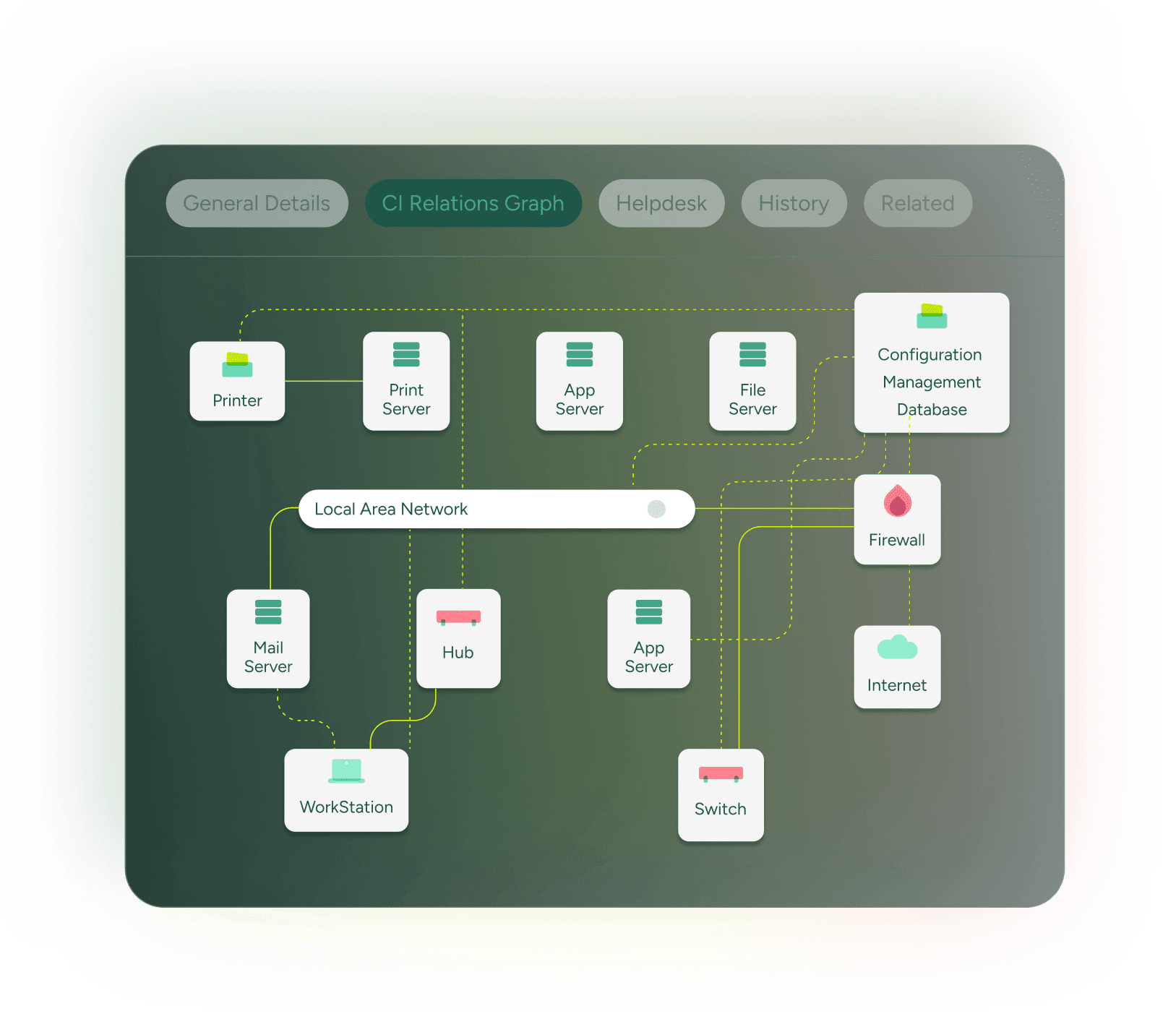
Get the bigger picture of your IT environment

Understand the ripple effect of every change
Avoid costly downtime with real-time impact visibility. SysAid CMDB helps you predict how any change—like a server replacement or software upgrade—will affect your IT environment, users, and services. Visualize dependencies so you can act with confidence and minimize risk.
Visualize how everything connects
Automatically map the relationships between your assets, applications, and services. Define both physical and logical connections—such as installed on, depends on, or accessed by— to clearly see how everything interacts and works together.
Let discovery do the work
SysAid’s CMDB automatically gathers data from across your IT environment—devices, applications, software, and services—using our Network Discovery module. You can also bulk import configuration items (CI), like laptops or servers, from CSV files for quick setup and ongoing maintenance.
Spot issues fast — and fix them smarter
When something goes wrong, SysAid’s CMDB helps you get to the root cause—fast. Track CI status in real time with clear visual indicators for incidents, problems, and alerts. See how issues impact connected components and plan your next steps with confidence.
Built-in and fully connected
Our CMDB is seamlessly integrated into the full SysAid platform—no extra setup, syncing, or third-party tools required.
It automatically links service records, tickets, assets, and tasks to give you a complete, real-time view of your configuration items (CIs).
- View full CI service history directly in the help desk
- Link CIs to tasks, activities, and catalog items
- Auto-set incident priorities based on asset data
- Maintain full audit trails for compliance
Every asset categorized your way
Capture all your IT and non-IT assets in one centralized source of truth. With SysAid’s CMDB, you can create, customize, and organize your CI inventory for complete visibility and control.
- Track unlimited CIs across your entire environment
- Use 250+ custom fields for detailed, tailored records
- Organize with CI types, subtypes, and custom tags
Smarter asset insights, powered by AI
Agents get instant visibility into assets linked to a ticket — including warranty status, software data, potential impact, and related issues in the queue. Our AI chatbot centralizes everything, so your team can act faster and resolve smarter.
Fast to set up.
Fast to scale.
SysAid fits neatly into your existing IT workflows and tech stack, to lift efficiency and productivity across your entire ecosystem.

Key features:
Inventory management
Seamlessly discover network assets and gain a comprehensive view of hardware components and software products, facilitating effective lifecycle management.
Software management
Efficiently manage installed software locations and automate renewal reminders for assets that agents have already installed, ensuring optimal software utilization and compliance.
Patch management
Deploy patches to multiple or individual computers according to customized policies, integrating seamlessly with change management processes.
Remote control
Allow service desk agents to securely resolve end-user issues from anywhere, boosting responsiveness and user satisfaction.
Network discovery
Leverage built-in discovery capabilities to scan IT assets and attributes across the network, with automatic updates to maintain data accuracy.
Service desk integration
Automatically including relevant asset information such as screenshots or videos for swift issue resolution. Agents can also track the asset source of requests/incidents.
Join 10M users all over the world


Seamless asset tracking with a unified CMDB.
